
Home
›
Office & Stationery
›
Printers
›
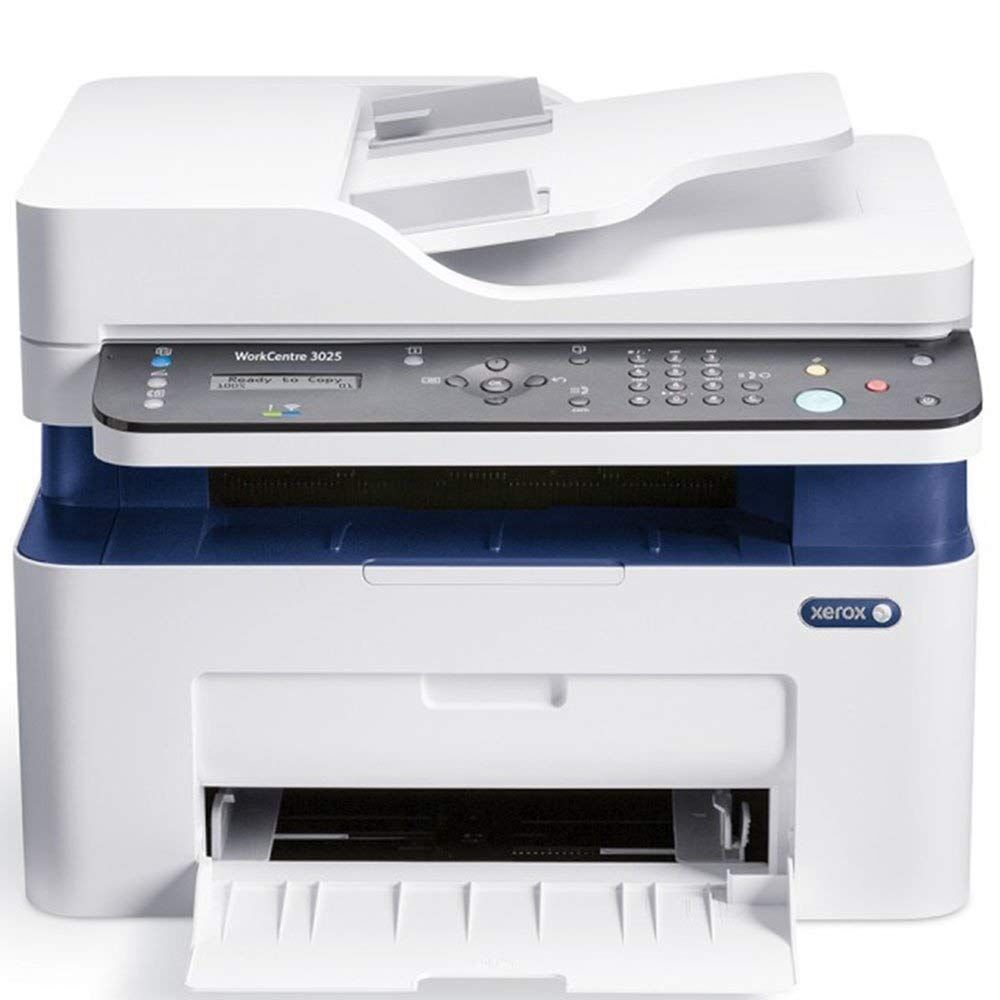
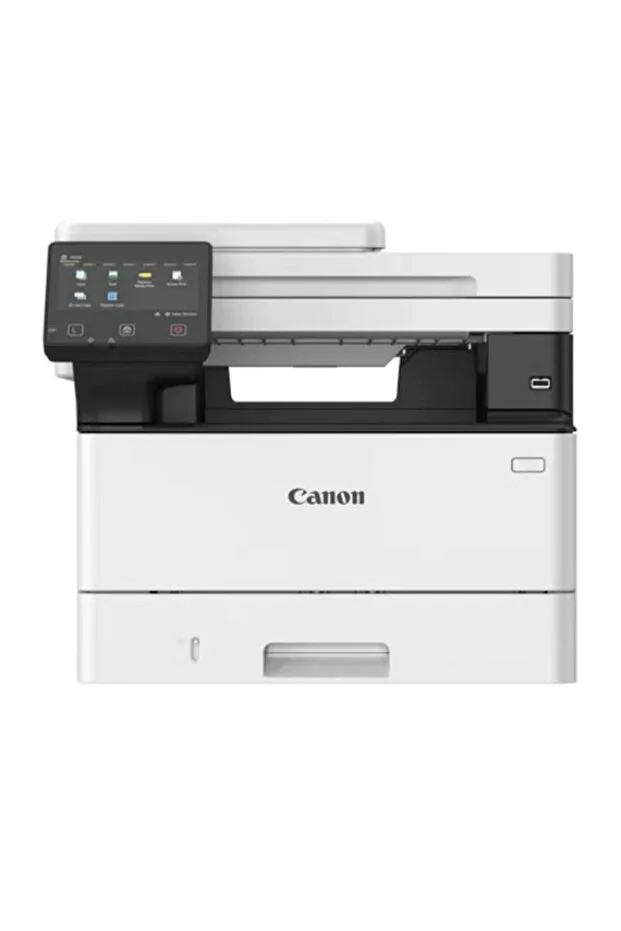
XEROX 3025V_BI BLACK-WHITE PRINTER/SCANNER/PHOTOCOPIER+WIFI LASER PRINTER
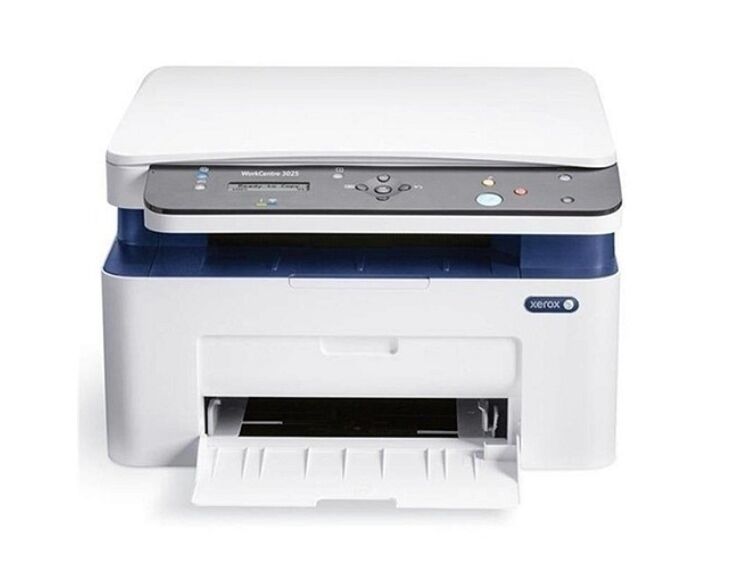
XEROX 3025V_BI BLACK-WHITE PRINTER/SCANNER/PHOTOCOPIER+WIFI LASER PRINTER
|
Satıcı: Beyaz Computer
287,98 €
15.953 TL
- 💳 Kredi Kartı ile Ödeme seçeneklerini görmek için tıklayın!
- 💵 Yukarıdaki fiyat %3 Nakit İndirimli fiyatıdır. Kredi Kartı ödemeleri için fiyat 296,88 €'dir.
- 🚚 1-2 iş günü içerisinde kargoda!
Kategori :
Office & Stationery ,
Printers
Öne Çıkan Özellikler
Brand
xerox
XEROX
Kapıya Teslimat
Ücretsiz İade
2 Günde Kapında
%5 İndirim
XEROX 3025V_BI BLACK-WHITE PRINTER/SCANNER/PHOTOCOPIER+WIFI LASER PRINTER
Black and white multifunctional printerThe high-productivity Xerox® WorkCentre® 3025 multifunction printer provides printing, copying and scanning by combining many essential office functions in a single device. Ideal for individual users or small work teams, black and white multifunctional printer style="box-sizing: border-box; --tw-border-spacing-x: 0; --tw-border-spacing-y: 0; --tw-translate-x: 0; --tw-translate-y: 0; --tw-rotate: 0; --tw-skew-x: 0; --tw-skew-y: 0; --tw-scale-x: 1; --tw-scale-y: 1; --tw-scroll-offset-width: 0px; --tw-ring-color: rgb(59 130 246 / 0.5); --tw-ring-shadow: 0 0 #0000; --tw-shadow: 0 0 #0000; --tw-shadow-colored: 0 0 #0000; border: 0px solid #e5e7eb;">dir.
![]()
- Print, copy, scan
- Integrated Wi-Fi connectivity
High impact. Affordable price. WorkCentre 3025 multifunction laser with USB and integrated Wi-Fi printer style="box-sizing: border-box; --tw-border-spacing-x: 0; --tw-border-spacing-y: 0; --tw-translate-x: 0; --tw-translate-y: 0; --tw-rotate: 0; --tw-skew-x: 0; --tw-skew-y: 0; --tw-scale-x: 1; --tw-scale-y: 1; --tw-scroll-offset-width: 0px; --tw-ring-color: rgb(59 130 246 / 0.5); --tw-ring-shadow: When you choose 0 0 #0000; --tw-shadow: 0 0 #0000; --tw-shadow-colored: 0 0 #0000; border: 0px solid #e5e7eb;">you get incredible results and rich standard features. --tw-border-spacing-y: 0; --tw-translate-y: 0; --tw-skew-y: 0; --tw-scale-y: 1; --tw-ring-offset-width: 0px; --tw-ring-color: rgb(59 130 246 / 0.5); --tw-ring-offset-shadow: 0 0 #0000; --tw-shadow: 0 0 #0000; --tw-shadow-colored: 0 0 #0000; border: 0px solid #e5e7eb;">
height Big pressure. One of the smallest sizes in its class, the WorkCentre 3025 saves space and reduces energy consumption and material costs by using some office device functions. --tw-skew-x: 0; --tw-scale-x: 1; --tw-scroll-snap-strictness: proximity; --tw-ring-offset-color: #fff; --tw-ring-color: 0.5); --tw-ring-shadow: 0 0 #0000; --tw-shadow-colored: 0 0 #0000; border: 0px solid #e5e7eb;">
No extra parts required. WorkCentre 3025 multifunction laser printer style="box-sizing: border-box; --tw-border-spacing-x: 0; --tw-border-spacing-y: 0; --tw-translate-x: 0; --tw-translate-y: 0; --tw-rotate: 0; --tw-skew-x: 0; --tw-skew-y: 0; --tw-scale-x: 1; --tw-scale-y: 1; --tw-scroll-offset-width: 0px; --tw-ring-color: rgb(59 130 246 / 0.5); --tw-ring-shadow: 0 0 #0000; --tw-shadow: 0 0 #0000; --tw-shadow-colored: 0 0 #0000; border: 0px solid #e5e7eb;"> simplifies consumable management and minimizes time spent on material replacement.![]()
height Big pressure. One of the smallest sizes in its class, the WorkCentre 3025 saves space and reduces energy consumption and material costs by using some office device functions. --tw-skew-x: 0; --tw-scale-x: 1; --tw-scroll-snap-strictness: proximity; --tw-ring-offset-color: #fff; --tw-ring-color: 0.5); --tw-ring-shadow: 0 0 #0000; --tw-shadow-colored: 0 0 #0000; border: 0px solid #e5e7eb;">
No extra parts required. WorkCentre 3025 multifunction laser printer style="box-sizing: border-box; --tw-border-spacing-x: 0; --tw-border-spacing-y: 0; --tw-translate-x: 0; --tw-translate-y: 0; --tw-rotate: 0; --tw-skew-x: 0; --tw-skew-y: 0; --tw-scale-x: 1; --tw-scale-y: 1; --tw-scroll-offset-width: 0px; --tw-ring-color: rgb(59 130 246 / 0.5); --tw-ring-shadow: 0 0 #0000; --tw-shadow: 0 0 #0000; --tw-shadow-colored: 0 0 #0000; border: 0px solid #e5e7eb;"> simplifies consumable management and minimizes time spent on material replacement.
Direct Access from AnywhereIntuitive Interface. You can easily carry out your daily tasks using the intuitive front panel of the device. --tw-scale-x: 1; --tw-scroll-snap-strictness: proximity; --tw-ring-offset-color: #fff; --tw-ring-color: rgb(59 130 246 / 0.5); #0000; --tw-ring-shadow: 0 0 #0000; --tw-shadow-colored: 0 0 #0000; line-height: 0px solid #e5e7eb;">
It's not complicated. Multifunctional printer style="box-sizing: border-box; --tw-border-spacing-x: 0; --tw-border-spacing-y: 0; --tw-translate-x: 0; --tw-translate-y: 0; --tw-rotate: 0; --tw-skew-x: 0; --tw-skew-y: 0; --tw-scale-x: 1; --tw-scale-y: 1; --tw-scroll-offset-width: 0px; --tw-ring-color: rgb(59 130 246 / 0.5); --tw-ring-shadow: 0 0 #0000; --tw-shadow: 0 0 #0000; --tw-shadow-colored: 0 0 #0000; border: 0px solid #e5e7eb;">where appropriate; Xerox® Wireless Easy Setup helps you quickly and easily connect to your Wi-Fi network. --tw-skew-y: 0; --tw-scale-y: 1; --tw-ring-offset-width: 0px; --tw-ring-color: rgb(59 130 246 / 0.5); --tw-ring-offset-shadow: 0 0 #0000; --tw-shadow: 0 0 #0000; --tw-shadow-colored: 0 0 #0000; border: 0px solid #e5e7eb;">
Direct Wi-Fi. The WorkCentre 3025 can connect to Wi-Fi-enabled devices without requiring an existing wireless network. Direct Wi-Fi; pocket phone style="box-sizing: border-box; --tw-border-spacing-x: 0; --tw-border-spacing-y: 0; --tw-translate-x: 0; --tw-translate-y: 0; --tw-rotate: 0; --tw-skew-x: 0; --tw-skew-y: 0; --tw-scale-x: 1; --tw-scale-y: 1; --tw-scroll-offset-width: 0px; --tw-ring-color: rgb(59 130 246 / 0.5); --tw-ring-shadow: 0 0 #0000; --tw-shadow: 0 0 #0000; --tw-border-spacing-y: 0; --tw-translate-y: 0; --tw-skew-x: 0; --tw-scale-y: 1; --tw-ring-offset-width: --tw-ring-offset-color: #fff; --tw-ring-color: rgb(59 130 246 / 0.5); --tw-ring-shadow: 0 0 #0000; --tw-shadow-colored: 0 0 #0000; color: #333333; text-decoration-line: none; background-color: transparent; line-height: 25.6px; border: 0px solid #e5e7eb;" href="https://www.incehesap.com/tablet-pc-fiyatlari/" rel="nofollow">tablet style="box-sizing: border-box; --tw-border-spacing-x: 0; --tw-border-spacing-y: 0; --tw-translate-x: 0; --tw-translate-y: 0; --tw-rotate: 0; --tw-skew-x: 0; --tw-skew-y: 0; --tw-scale-x: 1; --tw-scale-y: 1; --tw-scroll-offset-width: 0px; --tw-ring-color: rgb(59 130 246 / 0.5); --tw-ring-shadow: 0 0 #0000; --tw-shadow: 0 0 #0000; --tw-shadow-colored: 0 0 #0000; border: 0px solid #e5e7eb;">s and laptops --tw-border-spacing-y: 0; --tw-translate-y: 0; --tw-skew-y: 0; --tw-scale-y: 1; --tw-ring-offset-width: 0px; --tw-ring-color: rgb(59 130 246 / 0.5); --tw-ring-offset-shadow: 0 0 #0000; --tw-shadow: 0 0 #0000; --tw-shadow-colored: 0 0 #0000; text-decoration-line: none; background-color: transparent; line-height: 25.6px; border: 0px href="https://www.incehesap.com/hazir-sistemler-fiyatlari/" rel="nofollow">computer style="box-sizing: border-box; --tw-border-spacing-x: 0; --tw-border-spacing-y: 0; --tw-translate-x: 0; --tw-translate-y: 0; --tw-rotate: 0; --tw-skew-x: 0; --tw-skew-y: 0; --tw-scale-x: 1; --tw-scale-y: 1; --tw-scroll-offset-width: 0px; --tw-ring-color: rgb(59 130 246 / 0.5); --tw-ring-shadow: 0 0 #0000; --tw-shadow: 0 0 #0000; --tw-shadow-colored: 0 0 #0000; border: 0px solid #e5e7eb;">s multifunctional --tw-border-spacing-y: 0; --tw-translate-y: 0; --tw-skew-y: 0; --tw-scale-y: 1; --tw-ring-offset-width: 0px; --tw-ring-color: rgb(59 130 246 / 0.5); --tw-ring-offset-shadow: 0 0 #0000; --tw-shadow: 0 0 #0000; --tw-shadow-colored: 0 0 #0000; text-decoration-line: none; background-color: transparent; line-height: 25.6px; border: 0px href="https://www.incehesap.com/renkli-laser-yazici-fiyatlari/" rel="nofollow">printer style="box-sizing: border-box; --tw-border-spacing-x: 0; --tw-border-spacing-y: 0; --tw-translate-x: 0; --tw-translate-y: 0; --tw-rotate: 0; --tw-skew-x: 0; --tw-skew-y: 0; --tw-scale-x: 1; --tw-scale-y: 1; --tw-scroll-offset-width: 0px; --tw-ring-color: rgb(59 130 246 / 0.5); --tw-ring-shadow: 0 0 #0000; --tw-shadow: 0 0 #0000; --tw-shadow-colored: 0 0 #0000; border: 0px solid #e5e7eb;">allows a secure connection.
Option a lot. Photocopy features; Includes blending, ID card photocopying, N-up, automatic background hiding, and photo modes. --tw-skew-y: 0; --tw-scale-y: 1; --tw-ring-offset-width: 0px; --tw-ring-color: rgb(59 130 246 / 0.5); --tw-ring-offset-shadow: 0 0 #0000; --tw-shadow: 0 0 #0000; --tw-shadow-colored: 0 0 #0000; border: 0px solid #e5e7eb;">
Not noticeable. You won't forget it. You can always stay informed about the status of your print job, see the toner level, and with Xerox® CentreWare® IS computer style="box-sizing: border-box; --tw-border-spacing-x: 0; --tw-border-spacing-y: 0; --tw-translate-x: 0; --tw-translate-y: 0; --tw-rotate: 0; --tw-skew-x: 0; --tw-skew-y: 0; --tw-scale-x: 1; --tw-scale-y: 1; --tw-scroll-offset-width: 0px; --tw-ring-color: rgb(59 130 246 / 0.5); --tw-ring-shadow: 0 0 #0000; --tw-shadow: 0 0 #0000; --tw-shadow-colored: 0 0 #0000; color: #000000; border: 0px solid #e5e7eb;">You can get online support quickly.![]()
It's not complicated. Multifunctional printer style="box-sizing: border-box; --tw-border-spacing-x: 0; --tw-border-spacing-y: 0; --tw-translate-x: 0; --tw-translate-y: 0; --tw-rotate: 0; --tw-skew-x: 0; --tw-skew-y: 0; --tw-scale-x: 1; --tw-scale-y: 1; --tw-scroll-offset-width: 0px; --tw-ring-color: rgb(59 130 246 / 0.5); --tw-ring-shadow: 0 0 #0000; --tw-shadow: 0 0 #0000; --tw-shadow-colored: 0 0 #0000; border: 0px solid #e5e7eb;">where appropriate; Xerox® Wireless Easy Setup helps you quickly and easily connect to your Wi-Fi network. --tw-skew-y: 0; --tw-scale-y: 1; --tw-ring-offset-width: 0px; --tw-ring-color: rgb(59 130 246 / 0.5); --tw-ring-offset-shadow: 0 0 #0000; --tw-shadow: 0 0 #0000; --tw-shadow-colored: 0 0 #0000; border: 0px solid #e5e7eb;">
Direct Wi-Fi. The WorkCentre 3025 can connect to Wi-Fi-enabled devices without requiring an existing wireless network. Direct Wi-Fi; pocket phone style="box-sizing: border-box; --tw-border-spacing-x: 0; --tw-border-spacing-y: 0; --tw-translate-x: 0; --tw-translate-y: 0; --tw-rotate: 0; --tw-skew-x: 0; --tw-skew-y: 0; --tw-scale-x: 1; --tw-scale-y: 1; --tw-scroll-offset-width: 0px; --tw-ring-color: rgb(59 130 246 / 0.5); --tw-ring-shadow: 0 0 #0000; --tw-shadow: 0 0 #0000; --tw-border-spacing-y: 0; --tw-translate-y: 0; --tw-skew-x: 0; --tw-scale-y: 1; --tw-ring-offset-width: --tw-ring-offset-color: #fff; --tw-ring-color: rgb(59 130 246 / 0.5); --tw-ring-shadow: 0 0 #0000; --tw-shadow-colored: 0 0 #0000; color: #333333; text-decoration-line: none; background-color: transparent; line-height: 25.6px; border: 0px solid #e5e7eb;" href="https://www.incehesap.com/tablet-pc-fiyatlari/" rel="nofollow">tablet style="box-sizing: border-box; --tw-border-spacing-x: 0; --tw-border-spacing-y: 0; --tw-translate-x: 0; --tw-translate-y: 0; --tw-rotate: 0; --tw-skew-x: 0; --tw-skew-y: 0; --tw-scale-x: 1; --tw-scale-y: 1; --tw-scroll-offset-width: 0px; --tw-ring-color: rgb(59 130 246 / 0.5); --tw-ring-shadow: 0 0 #0000; --tw-shadow: 0 0 #0000; --tw-shadow-colored: 0 0 #0000; border: 0px solid #e5e7eb;">s and laptops --tw-border-spacing-y: 0; --tw-translate-y: 0; --tw-skew-y: 0; --tw-scale-y: 1; --tw-ring-offset-width: 0px; --tw-ring-color: rgb(59 130 246 / 0.5); --tw-ring-offset-shadow: 0 0 #0000; --tw-shadow: 0 0 #0000; --tw-shadow-colored: 0 0 #0000; text-decoration-line: none; background-color: transparent; line-height: 25.6px; border: 0px href="https://www.incehesap.com/hazir-sistemler-fiyatlari/" rel="nofollow">computer style="box-sizing: border-box; --tw-border-spacing-x: 0; --tw-border-spacing-y: 0; --tw-translate-x: 0; --tw-translate-y: 0; --tw-rotate: 0; --tw-skew-x: 0; --tw-skew-y: 0; --tw-scale-x: 1; --tw-scale-y: 1; --tw-scroll-offset-width: 0px; --tw-ring-color: rgb(59 130 246 / 0.5); --tw-ring-shadow: 0 0 #0000; --tw-shadow: 0 0 #0000; --tw-shadow-colored: 0 0 #0000; border: 0px solid #e5e7eb;">s multifunctional --tw-border-spacing-y: 0; --tw-translate-y: 0; --tw-skew-y: 0; --tw-scale-y: 1; --tw-ring-offset-width: 0px; --tw-ring-color: rgb(59 130 246 / 0.5); --tw-ring-offset-shadow: 0 0 #0000; --tw-shadow: 0 0 #0000; --tw-shadow-colored: 0 0 #0000; text-decoration-line: none; background-color: transparent; line-height: 25.6px; border: 0px href="https://www.incehesap.com/renkli-laser-yazici-fiyatlari/" rel="nofollow">printer style="box-sizing: border-box; --tw-border-spacing-x: 0; --tw-border-spacing-y: 0; --tw-translate-x: 0; --tw-translate-y: 0; --tw-rotate: 0; --tw-skew-x: 0; --tw-skew-y: 0; --tw-scale-x: 1; --tw-scale-y: 1; --tw-scroll-offset-width: 0px; --tw-ring-color: rgb(59 130 246 / 0.5); --tw-ring-shadow: 0 0 #0000; --tw-shadow: 0 0 #0000; --tw-shadow-colored: 0 0 #0000; border: 0px solid #e5e7eb;">allows a secure connection.
Option a lot. Photocopy features; Includes blending, ID card photocopying, N-up, automatic background hiding, and photo modes. --tw-skew-y: 0; --tw-scale-y: 1; --tw-ring-offset-width: 0px; --tw-ring-color: rgb(59 130 246 / 0.5); --tw-ring-offset-shadow: 0 0 #0000; --tw-shadow: 0 0 #0000; --tw-shadow-colored: 0 0 #0000; border: 0px solid #e5e7eb;">
Not noticeable. You won't forget it. You can always stay informed about the status of your print job, see the toner level, and with Xerox® CentreWare® IS computer style="box-sizing: border-box; --tw-border-spacing-x: 0; --tw-border-spacing-y: 0; --tw-translate-x: 0; --tw-translate-y: 0; --tw-rotate: 0; --tw-skew-x: 0; --tw-skew-y: 0; --tw-scale-x: 1; --tw-scale-y: 1; --tw-scroll-offset-width: 0px; --tw-ring-color: rgb(59 130 246 / 0.5); --tw-ring-shadow: 0 0 #0000; --tw-shadow: 0 0 #0000; --tw-shadow-colored: 0 0 #0000; color: #000000; border: 0px solid #e5e7eb;">You can get online support quickly.
Stable OperationHigh performance. WorkCentre 3025 black and white multifunction laser printer style="box-sizing: border-box; --tw-border-spacing-x: 0; --tw-border-spacing-y: 0; --tw-translate-x: 0; --tw-translate-y: 0; --tw-rotate: 0; --tw-skew-x: 0; --tw-skew-y: 0; --tw-scale-x: 1; --tw-scale-y: 1; --tw-scroll-offset-width: 0px; --tw-ring-color: rgb(59 130 246 / 0.5); --tw-ring-shadow: 0 0 #0000; --tw-shadow: 0 0 #0000; --tw-shadow-colored: 0 0 #0000; border: 0px solid #e5e7eb;"> handles heavy workloads.
Less don't wait. Thanks to high print speeds of 20 pages per minute, you spend less time waiting and more time for your customers. --tw-skew-y: 0; --tw-scale-y: 1; --tw-ring-offset-width: 0px; --tw-ring-color: rgb(59 130 246 / 0.5); --tw-ring-offset-shadow: 0 0 #0000; --tw-ring-shadow: 0 0 #0000; --tw-shadow-colored: 0 0 #0000; border: 0px solid #e5e7eb;">Visually impressive. Text and graphics with enhanced image quality at print resolutions up to 1200 x 1200 dpi add significant visual impact to important print jobs. --tw-rotate: 0; --tw-skew-y: 1; --tw-scroll-snap-strictness: proximity; --tw-ring-offset-color: #fff; 130 246 / 0.5); --tw-ring-shadow: 0 0 #0000; --tw-shadow-colored: 0 0 #0000; border: 0px solid #e5e7eb;">
Increased strength. With the 600 MHz powerful processor and 128 MB memory, you can do all the demanding work quickly and effectively.![]()
Less don't wait. Thanks to high print speeds of 20 pages per minute, you spend less time waiting and more time for your customers. --tw-skew-y: 0; --tw-scale-y: 1; --tw-ring-offset-width: 0px; --tw-ring-color: rgb(59 130 246 / 0.5); --tw-ring-offset-shadow: 0 0 #0000; --tw-ring-shadow: 0 0 #0000; --tw-shadow-colored: 0 0 #0000; border: 0px solid #e5e7eb;">Visually impressive. Text and graphics with enhanced image quality at print resolutions up to 1200 x 1200 dpi add significant visual impact to important print jobs. --tw-rotate: 0; --tw-skew-y: 1; --tw-scroll-snap-strictness: proximity; --tw-ring-offset-color: #fff; 130 246 / 0.5); --tw-ring-shadow: 0 0 #0000; --tw-shadow-colored: 0 0 #0000; border: 0px solid #e5e7eb;">
Increased strength. With the 600 MHz powerful processor and 128 MB memory, you can do all the demanding work quickly and effectively.
Ürün Özellikleri
Brand
xerox
No questions for this product yet. Be the first to ask!
Installment Options
Tüm kredi kartlarına peşin fiyatına 3 taksit, avantajlı oranlarla 12 taksite varan ödeme kolaylığı mağazamızda sizi bekliyor.
| Bank | 3 Installments | 6 Installments | 9 Installments | 12 Installments |
|---|---|---|---|---|
| Maximum (İş Bankası) | 3 x €95.99 Vade Farksız |
6 x €51.84 Toplam: €311.01 |
9 x €35.84 Toplam: €322.53 |
12 x €27.84 Toplam: €334.05 |
| World (Yapı Kredi) | 3 x €95.99 Vade Farksız |
6 x €51.84 Toplam: €311.01 |
9 x €35.84 Toplam: €322.53 |
12 x €27.84 Toplam: €334.05 |
| Bonus (Garanti BBVA) | 3 x €95.99 Vade Farksız |
6 x €51.84 Toplam: €311.01 |
9 x €35.84 Toplam: €322.53 |
12 x €27.84 Toplam: €334.05 |
| Axess (Akbank) | 3 x €95.99 Vade Farksız |
6 x €51.84 Toplam: €311.01 |
9 x €35.84 Toplam: €322.53 |
12 x €27.84 Toplam: €334.05 |
| CardFinans (QNB) | 3 x €95.99 Vade Farksız |
6 x €51.84 Toplam: €311.01 |
9 x €35.84 Toplam: €322.53 |
12 x €27.84 Toplam: €334.05 |
| Paraf (Halkbank) | 3 x €95.99 Vade Farksız |
6 x €51.84 Toplam: €311.01 |
9 x €35.84 Toplam: €322.53 |
12 x €27.84 Toplam: €334.05 |
İade ve İptal Prosedürleri
Satın aldığınız ürünleri teslim aldığınız tarihten itibaren 14 gün içerisinde herhangi bir gerekçe göstermeksizin ve cezai şart ödemeksizin iade edebilir veya değiştirebilirsiniz.
İade Şartları:
- İade edilecek ürünün ambalajı, kutusu ve standart aksesuarları zarar görmemiş, eksiksiz olmalıdır.
- Tekrar satılabilirlik özelliğini yitirmiş, kullanılmış veya hasar görmüş ürünlerin iadesi kabul edilmemektedir.
- Hijyenik sebeplerle kulak içi kulaklık, kişisel bakım ürünleri gibi ürünlerde ambalaj açıldıktan sonra iade yapılabilmesi için ürünün arızalı olması gerekir.
Nasıl İade Ederim?
İade talebinizi üye profilinizden veya müşteri hizmetlerimizle iletişime geçerek başlatabilirsiniz. Ürünü faturasıyla birlikte anlaşmalı kargo şubelerimizden ücretsiz olarak gönderebilirsiniz.

No reviews for this product yet. Be the first to review!